v1.2.0
Dell Fan Control
Professional CLI utility for comprehensive Dell thermal management.
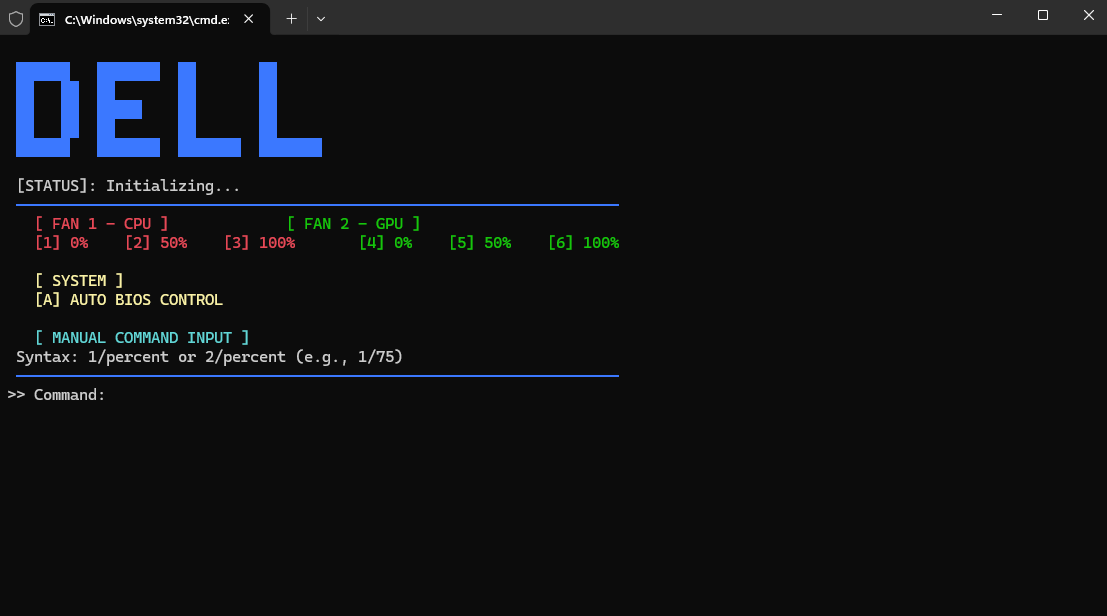
🕹️ Usage Guide
- Fan ID:
1(CPU Fan),2(GPU Fan). - Device Support: Extensive compatibility for Inspiron, Vostro, Latitude, XPS, Precision, Alienware, and Dell Pro series.
- Fixed Speed: Press
1-6. - Custom: Use
FanID/Speed%(e.g.,1/75).
💡 Advanced FAQ
Does this affect system warranty?
No, it's a software override that resets automatically upon system reboot.
Is it safe for high-end workstations?
Yes, it is specifically designed for extreme workloads on high-end Dell systems to effectively prevent thermal throttling.
Dell Fan Control
Công cụ quản lý tản nhiệt Dell chuyên nghiệp bằng dòng lệnh.
🕹️ Hướng dẫn sử dụng
- Fan ID:
1là Quạt CPU,2là Quạt GPU. - Dòng máy: Hỗ trợ từ Inspiron, Vostro, Latitude đến các dòng cao cấp như XPS, Precision, Alienware và Dell Pro.
- Tốc độ cố định: Nhấn
1-6. - Tùy chỉnh: Nhập
FanID/Tốc_độ%(Ví dụ:1/75).
💡 Câu hỏi thường gặp
Sử dụng công cụ có ảnh hưởng tới bảo hành không?
Hoàn toàn không. Đây chỉ là can thiệp phần mềm tạm thời, các thiết lập sẽ tự động mất đi khi khởi động lại máy.
Có an toàn cho các dòng máy cao cấp không?
Công cụ được thiết kế để chống nghẽn nhiệt (thermal throttling) trên các dòng workstation như Precision và Alienware, rất an toàn khi thực hiện tác vụ nặng.